Whistle blowing System
Designing a secure and user-friendly case management platform
Timeline
3 months (2023)
Tools
Figma, Miro, Appian
Role
UI/UX Design, Requirement gathering, Design Documentation, User flow, Front-end Design.
Team
1 UI/UX Designer, 1 Business Analyst, 6 developers, 2 testers
PROJECT OVERVIEW
This project focused on designing a whistleblowing case management system to support reporting, tracking, and resolution of sensitive cases within an organization.
As the sole UX/UI designer, I worked closely with stakeholders and users to create a platform that ensures security, transparency, and efficiency while handling confidential information.
“Due to NDA constraints, visuals and specific details have been generalized”
PROBLEM
The existing process involved:
Handling sensitive data
Multi-level decision-making workflows
Fragmented and manual case tracking
This resulted in:
Limited visibility across case stages
Delays in resolution
Difficulty managing and prioritizing cases
The challenge was to design a system that is secure, scalable, and easy to use, while supporting complex workflows.
USERS
Case Management Team
Creates and manages records
Performs initial assessments

Decision-Making Committee
Reviews cases
Takes action and final decisions
These users work with sensitive data, operate across multiple stages and require clarity and efficiency
MY ROLE
Sole UX/UI Designer
Conducted stakeholder and user interviews
Defined user flows and information architecture
Designed wireframes, prototypes, and high-fidelity UI in Figma
Implemented front-end using a low-code platform Appian
DESIGN PROCESS
-- My Approach --
Stakeholder/
user interview
Research
Empathize
Information
architecture
Task Flow
Ideate
Wireframe
Low-fidelity
Prototype
Design
Internal testing
User review
Test
Requirement
updates
High-fidility
Iterate
RESEARCH & REQUIREMENTS
I conducted discussions with stakeholders to understand:
Existing workflows
Role responsibilities
Pain points in managing cases
KEY TAKEAWAYS
Users needed clear visibility of case progress
Managing multiple cases simultaneously was difficult
Strong need for structured workflows and prioritization
Security and access control were critical
Challenges
Lack of a centralized system
Inconsistent workflows across teams
Difficulty in tracking progress and dependencies
Outcomes
Identified key pain points and workflow gaps
Defined initial system requirements
Established a foundation for structured design
BASIC FLOW
Create record
Review
Multi-level Assessment
Genuine Case?
Notify the reporter
Log In
Close Case?
Decision Committee
Further Assessment
Notify & close
Incoming Request
STAKEHOLDER EXPECTATIONS
Role-based access control
Ensure that only authorised personnel have access to sensitive information. Define different roles for administrators,secretary group and committee members.
Case management work flow
An intuitive case management workflow that allows admins and investigators to easily track and manage the progress of each reported incident at any point from initial intake to resolution.
Categorize based on criticality
Users mentioned, they would like to prioritise the reports based on criticality of the cases
Remainders based on criticality
Users also mentioned, the frequency of remainders should be proportional to criticality of cases.
DESIGN CONSIDERATIONS
Accommodate diverse scenarios
Design should be reliable, contextually aware, and taken into the varations and highest probability scenarios
Anonymous Reporting
the design is dynamic for anonymous reporting to protect the identity and safety of whistleblowers.
Automated Notifications
Automated notification systems to alert investigators and administrators about critical updates, deadlines, or escalations within the case management process
Scalability & Flexibility
To be scalable and flexible, capable of handling a growing volume of reports and adapting to changes in organisational processes or regulatory requirements.
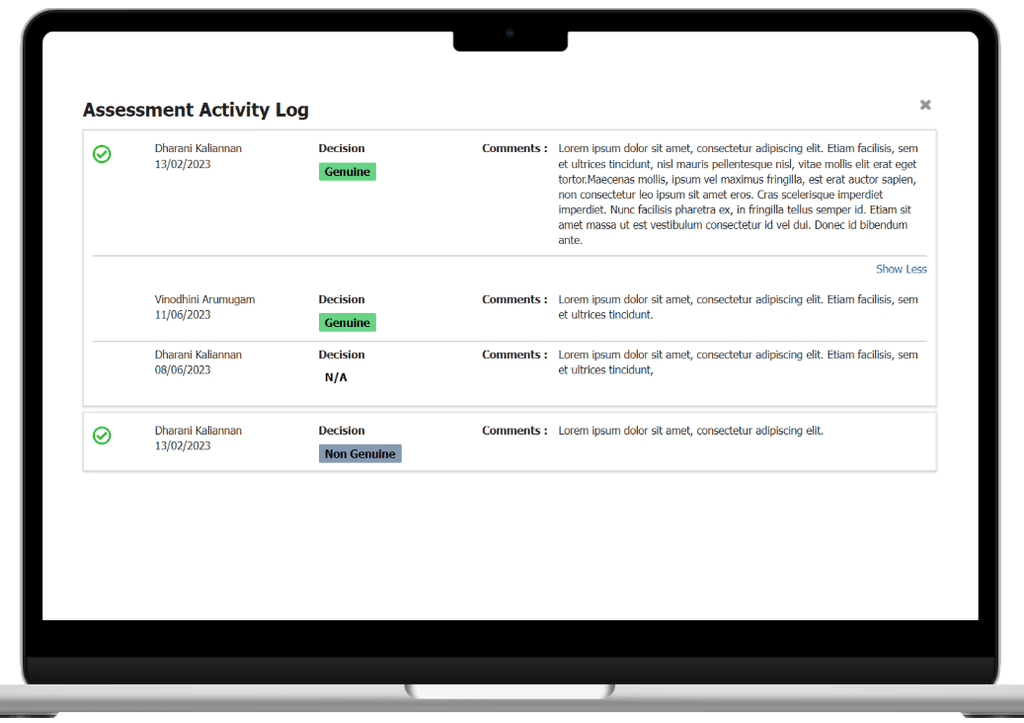
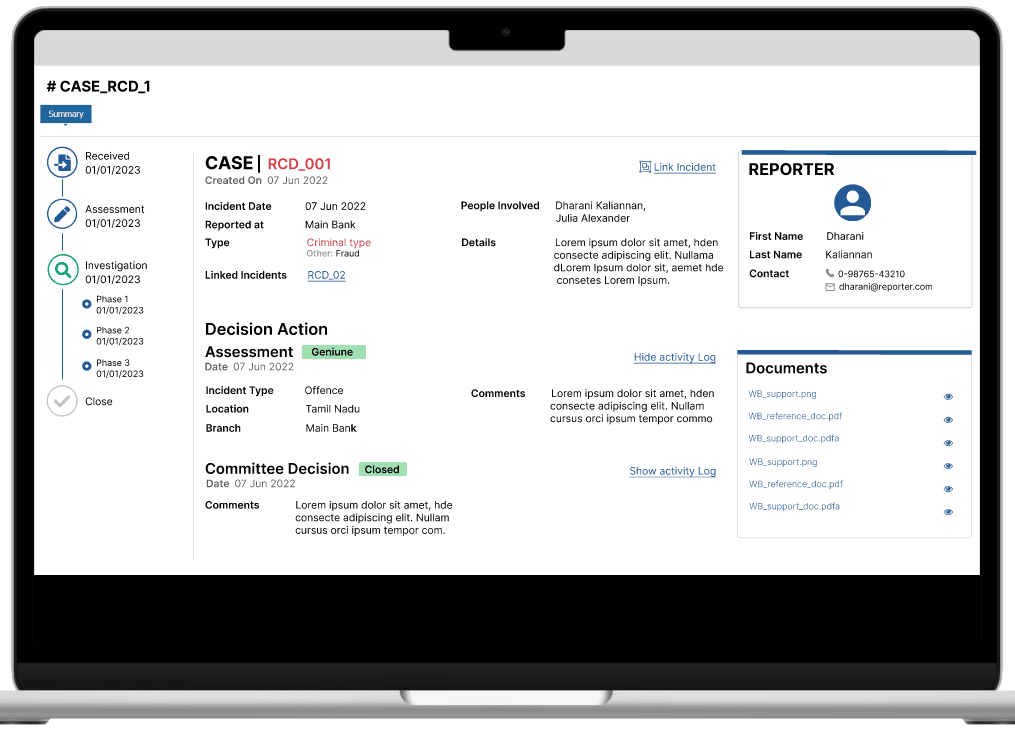
“Due to NDA constraints details have been generalized”
LEARNINGS
Stakeholders requirements gather session taught me the empathizing with users is paramount.
Communication is crucial in a UX project, between team members, stakeholders, and users.
Documentation of process is important for project continuity and knowledge transfer.
Most importantly, I learned that designing process is dynamic, and getting feedback and iterations are the best way to learn.
Outcome
The design positively impacted our business goals, and users valued clear and concise communication within the app and the feedback showed the visible increase in usability. Finally, it increased user satisfaction, improved task efficiency for the bank employees.
Reach out. Let's ideate.
dharani232k@gmail.com